Events, Organizations and Secrets
A coronation, a secret society and a concealed identity each raise different questions while you write. Events help you remember what happened and why. Organizations hold the groups that shape your world. Secrets keep the truth, who knows it and the planned revelation together. Add the information you need now; you do not have to fill every field.
Record an event
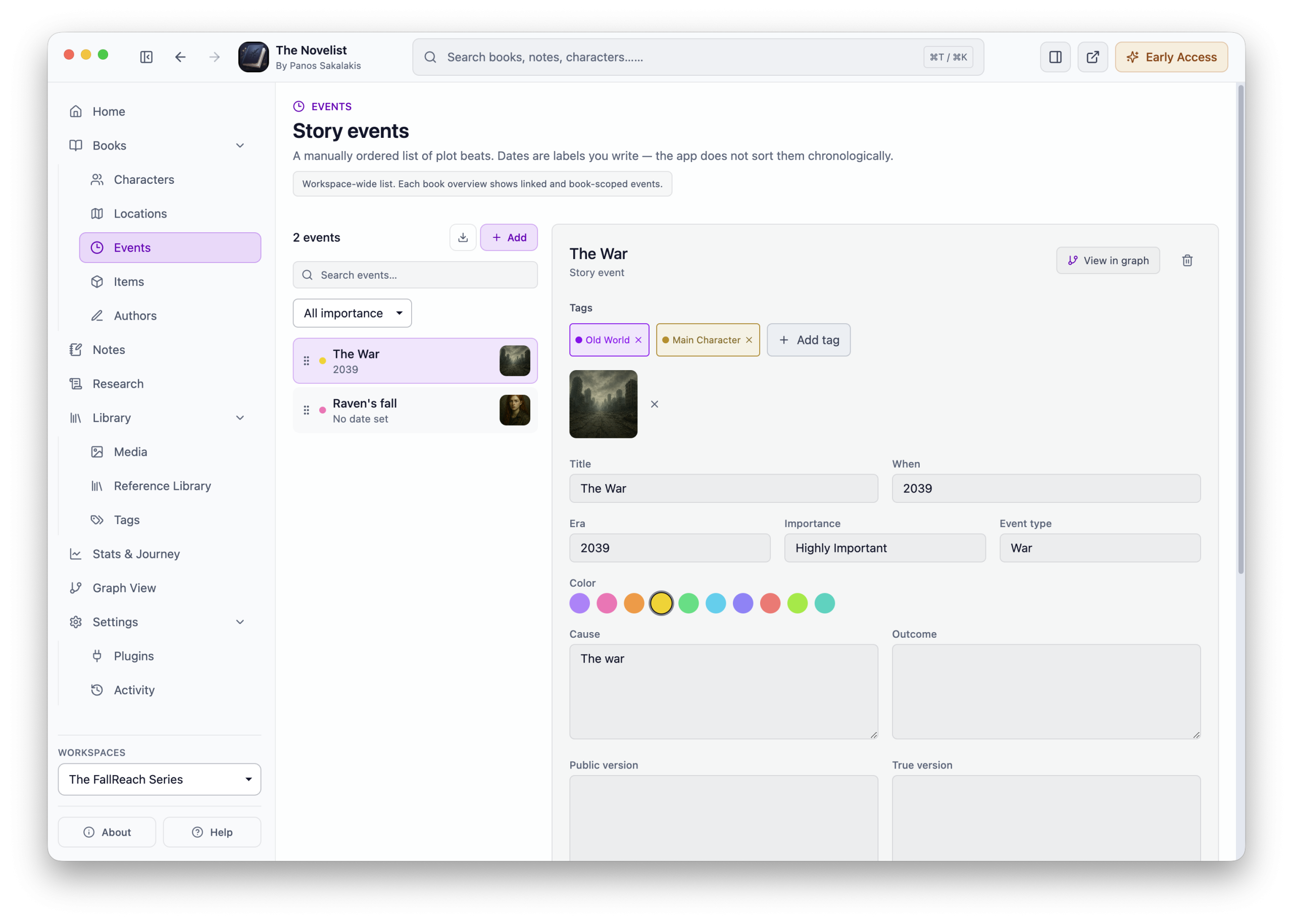
- Open Books and choose the book you are planning, then open Events from the left navigation.
- Select Add and replace the untitled event with a useful Title, such as The bridge collapses.
- Fill in When in words that suit your story: Winter 1842, Day three or Before the wedding. Add a description of what happens.
- Use the cause and outcome fields to note what brings the event about and what changes afterward. Leave a field when you finish typing to save your changes.
- Under Participants & setting, choose the Primary setting. To add a character, select Add, choose the character and their role, then select Add participant.
You can also record an era, importance, event type and tags. The public version and true version fields are useful when the world believes one account of an event but you know another: a supposed accident might actually have been sabotage.
Drag events in the list to arrange them in the order you want to work with. The date is text you supply, so changing it does not automatically rearrange the list. This lets you use fictional calendars or deliberately plan flashbacks alongside present-day events.
Give your groups a purpose
- Open Locations from the left navigation and select the Organizations tab.
- Select Add and replace the unnamed organization's name.
- Add its type, leader, purpose, members and resources as needed. Changes save when you leave a field.
For a smugglers' guild, you might note that it controls the river crossings, answers to an absent leader and needs the protagonist's help. These notes give you something concrete to return to when a group's loyalties or influence matter in a scene.
Plan a secret and its revelation
- In Locations, select the Secrets tab and select Add.
- Give the secret a recognizable title, then describe the hidden truth.
- Use Reveal point to note when you intend to reveal it, Known by for those who know and Hidden from for those who do not. Changes save when you leave a field.
For example, the heir might know that the royal seal is a forgery while the captain still trusts it. A note such as After the river ambush can remind you where the revelation belongs. Use these details during revision to check that a character does not act on information they have not yet learned.
With Entity Links enabled in Plugins, the Connections panel lets you link an organization or secret to relevant writing or story details. Select Link, choose the target and relationship, then select Add link.
Format an event description
Formatting controls are available in Description while creating an Event, so you can organize the account of what happens before saving it.